
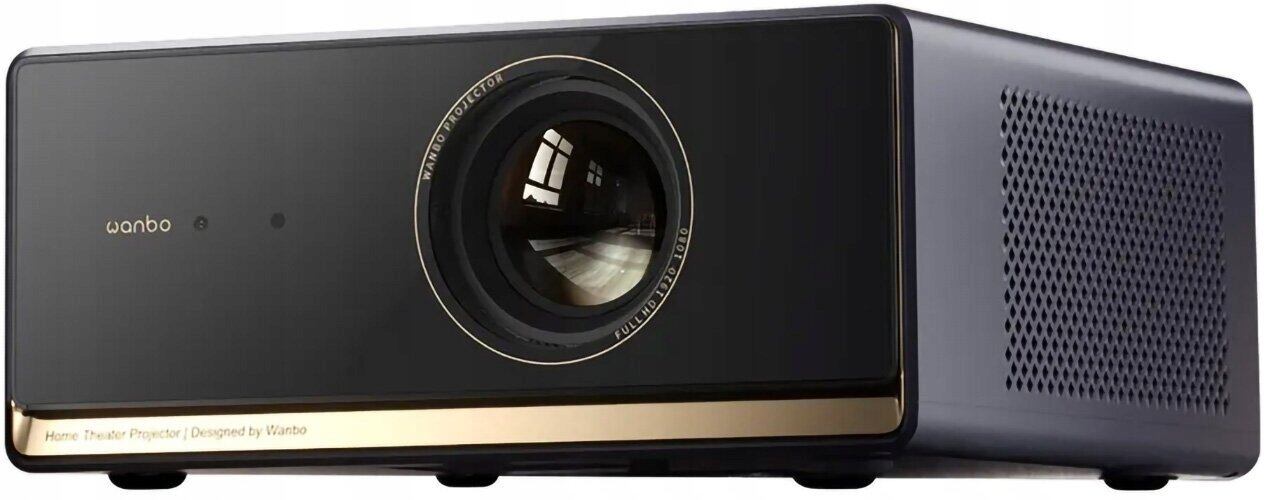
Wanbo Portable Projector X5 Pro
Product information
Description
WANBO X5 Pro is a compact home projector with 1100 ANSI lumens brightness and native 1080p (1920x1080) LCD projection. It features HDR10 support, built-in Google TV for streaming more than 10,000 apps, auto-focus and ASA 3.0 alignment tools, and twin 6 W sealed speakers for stereo sound. The unit offers quiet cooling (≤26 dB), a long LED life, and an adjustable desktop stand for flexible viewing angles.
Advantages
The 1100 ANSI lumens output produces clear images with strong contrast and visible detail in both bright and dark scenes. HDR10 enhances color accuracy and dynamic range, while Google TV simplifies access to streaming services and apps. ASA 3.0 provides automatic focus, keystone correction, screen fit and obstacle avoidance for fast setup. Built-in dual 6 W speakers and a 375 cc chamber deliver fuller sound without requiring external speakers, and the low-noise cooling supports comfortable, uninterrupted viewing.
Suitable for
Home cinema and movie nights
Streaming TV shows and apps via Google TV
Gaming on a large screen
Presentations and mobile casting from phone or laptop
Key specifications
Projection technology: LCD
Brightness: 1100 ANSI lumens
Native resolution: 1080p (1920x1080), 16:9
HDR: HDR10 support
Speakers: Dual sealed chambers with 2 x 6 W output (12 W total)
Noise level: ≤26 dB
LED life: up to 20,000 hours
Screen size compatibility: 40–140" (approx. 1016–3556 mm)
Focus: Auto-focus with ASA 3.0 alignment features (auto-focus, keystone correction, screen fit, obstacle avoidance)
Connectivity: Wi‑Fi, Bluetooth, HDMI (upgraded HDMI 2.0 compatibility)
Power: AC 65 W
Weight and colour: about 2.68 kg, blue finish
How to use
Place the WANBO X5 Pro on a stable surface or mount it using the dedicated desktop stand and adjust the tilt between 0° and 15° as needed. Connect power and any HDMI sources or use built-in Wi‑Fi to sign in to Google TV for streaming. Use the ASA 3.0 automatic setup to achieve sharp focus and correct keystone; manual adjustments are available via on-screen menu. For mobile casting, enable casting on your phone or laptop and select the projector as the display target. Adjust volume and picture mode from the smart remote or on-screen controls.
Usage recommendations
For best image quality, position the projector at a distance that produces a screen between 40" and 140" and use a neutral, lightly reflective screen or wall to preserve HDR10 color and contrast. Keep ventilation clear to maintain low fan noise and long LED life.
Related Products
Ready to Order?
Contact us today for wholesale pricing, bulk order discounts, and customized solutions for your business